UNGM UNSPSC Codes: How to Choose the Right Codes for Registration and Tender Alerts
BidClarity Editorial Team · Reviewed against official sources on
Quick answer: UNGM, the United Nations Global Marketplace, uses UNSPSC codes (the United Nations Standard Products and Services Code) in two places. Your registration profile uses them to describe what you sell, so UN staff can find you. Procurement notices use them to describe what is being bought. UNGM asks you to pick the most detailed codes that fit, as many as you need to describe your business fully. Codes that are too broad bring alerts you cannot use.
Key facts
- Structure: four levels (Segment, Family, Class, Commodity), each adding two digits to an eight-digit code.
- Registration: every supplier classifies its goods and services with UNSPSC codes at the Basic level.
- Procurement notices: UN staff tag each notice with UNSPSC codes.
- Alerts: UNGM's Tender Alert Service (TAS) matches your chosen codes against those notices. It is part of UNGM Pro, a paid subscription; registration itself is free.
- Official source: the UNGM Help Centre.
In this guide
Why the codes matter on UNGM
UNGM uses the codes you choose at registration to match you with UN organizations that may buy those goods and services, and UN staff use them to find relevant suppliers. UNGM calls the choice "of critical importance".
The same codes work in the other direction. When UN staff publish a procurement opportunity, they classify it with UNSPSC codes, and suppliers use those codes to find opportunities in their categories.
How the UNSPSC hierarchy works
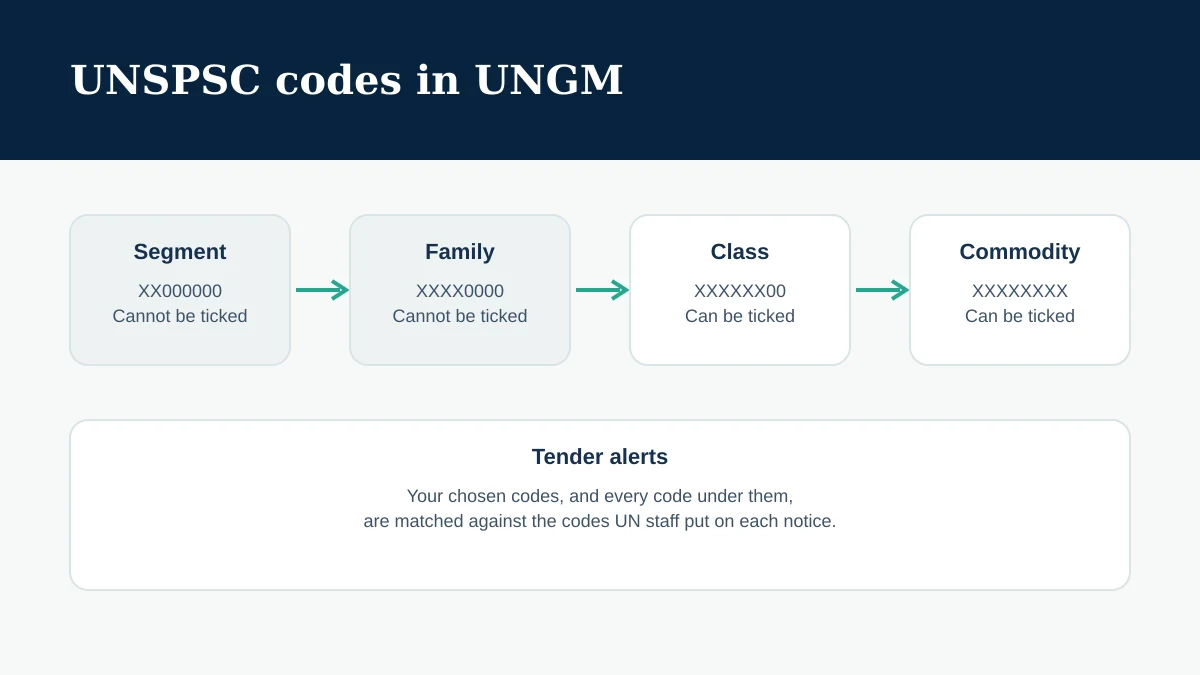
A UNSPSC code has eight digits in four pairs. Each pair narrows the one before it.
| Level | Code pattern | Can you tick it in UNGM? |
|---|---|---|
| Segment | XX000000 | No |
| Family | XXXX0000 | No |
| Class | XXXXXX00 | Yes |
| Commodity | XXXXXXXX | Yes |
UNGM does not let you tick a Segment or a Family, "to ensure a more accurate selection". When you tick a Class, every code under it is selected too. So a Class is still a broad choice: tick one only if you supply most of what sits under it.
Product codes run from 10000000 to 60000000, plus 95000000. Service codes run from 64000000 to 94000000. Make sure each code you choose is in the right range for what you actually deliver.
How to find the right codes
In the registration form, type one keyword at a time. UNGM suggests codes for each keyword. If nothing relevant appears, try other words for the same product or service, including the words a buyer would use rather than your internal product names.
Then look at real notices. Open recent UNGM opportunities you would have wanted to bid on and note the UNSPSC codes UN staff gave them. UNGM suggests the same approach for alerts: check the codes on a relevant opportunity and select the same codes.
How many codes should you choose?
As many as you need to describe your goods and services fully, and no more. UNGM asks you to select the most detailed code within the classification, at the lowest level.
Choosing codes "just in case" works against you. Your profile describes work you cannot deliver, and your alerts fill with notices you would never bid on.
What if no code fits your product?
UNGM explains that UN organizations use a selected list of UNSPSC codes, matching what they may buy. If you cannot find a code for your product or service, UN organizations may not buy it. UNGM points to its Annual Statistical Report on United Nations Procurement for what the UN does buy.
If you offer something new or very specific, UNGM suggests selecting several codes that together cover it. If you still cannot find a suitable code, contact UNGM through the Help Centre's contact form with a description of what you supply. Do not pick an unrelated code just to finish the form.
How the codes drive Tender Alert Service
Tender Alert Service is part of UNGM Pro, a paid subscription. It is separate from registration, which UNGM says is free of charge. You choose its codes under My UNGM Pro, starting from the codes in your Basic registration, and you can change them at any time.
Each day, the service compares newly published or revised notices with your codes. You get an alert when a notice carries one of your codes or a code under it: choose 20100000, mining and quarrying machinery and equipment, and you also get notices coded 20101500, cutting equipment. You can also filter alerts by beneficiary country or territory.
If the alerts are mostly irrelevant, UNGM's advice is to replace broad codes with more detailed ones and review your country selection.
Practical checklist
- List what you really sell, in the words buyers use.
- Search one keyword at a time, and try more than one word.
- Choose Commodity codes, or a Class only when most of it fits.
- Check that product and service codes match what you deliver.
- Compare your codes with those on recent notices you wanted.
- If you use Tender Alert Service, refine broad codes when alerts miss the mark.
- Update your codes when your offering changes.
Where BidClarity fits
BidClarity helps suppliers decide which public sector opportunities are worth pursuing. UNSPSC codes decide which UNGM notices reach you; whether a specific tender fits your business is a separate question, and the solicitation's own requirements decide whether you can bid.
To see which procurement sources BidClarity reads, and the status of each, see Procurement Sources.
See which open opportunities fit your company, and why.
Common questions
Do UNSPSC codes decide whether I can bid?
No. They classify suppliers and notices. Whether you can bid depends on the opportunity's own requirements, including the UNGM registration level it asks for.
Can I choose more than one UNSPSC code?
Yes. UNGM asks you to include as many codes as you need to describe your goods and services fully.
Are UNSPSC codes the same as CPV or NAICS codes?
No. They are different classification systems. The UN system uses UNSPSC; the European Union uses CPV codes, and the United States uses NAICS codes for industries.
Related guides
Official sources
- UNGM Help Centre: What are UNSPSC codes?
- UNGM Help Centre: How to select UNSPSC codes?
- UNGM Help Centre: How to select UNSPSC codes when relevant codes may not be found?
- UNGM Help Centre: How to select UNSPSC codes in TAS?
- UNGM Help Centre: How does the Tender Alert Service (TAS) work?
- UNGM Help Centre: Why am I receiving irrelevant notifications from TAS?
- UNGM Help Centre: Is the registration on UNGM free of charge?
This guide is general information, not legal or procurement advice. The solicitation and the official sources control. If something here no longer matches them, report a correction.