For businesses delivering public sector contracts
Winning the contract is only the start.
Keep the delivery dates, changes and invoices together, so you can see what needs doing and what you’re still owed.
Some features shown here are being added. They are marked below.
Haven't won a contract yet? Find ones worth bidding on →
Illustrative example
This week's overview, built from the clauses Fulfill read in your signed contract. Each line links to the clause or the record behind it.
Four practical questions, answered from the contract.
Every answer links to the clause, the record or the file it comes from. Being added Fulfill shows what the contract requires and what your team has recorded; the decisions stay yours.
What must we deliver?
Every deliverable and line item in the contract, with its due date, submission method and acceptance. Every obligation read out of the contract, with its clause. Who is needed, what each subcontractor must deliver, and whether you are ready to start.
Record today's workWhat changed?
A change logged the day it happens, with the notice the contract requires and its clock. A required person who is unavailable next month. A certificate that runs out before the work does. Each issue with an owner, a next action and a date. Being added
Something changedCan we invoice?
Delivered is not accepted, and accepted is not paid. Fulfill shows exactly where each invoice is, from sent to paid, with the due date the contract sets, the date you expect and the date the money arrives. Being added
Can I invoice?What can we show next time?
What happened, when, who confirmed it and the file that shows it. Being added Your reply to the buyer's review of your work, a written summary of what you delivered when the contract ends, and the delivery record ready for your next bid. Being added
Export the recordOne awarded contract, from the first day on site to the last payment and the record for your next bid.
Quarterly service report (deliverable 4)
From your contract Being added
 Illustrative example
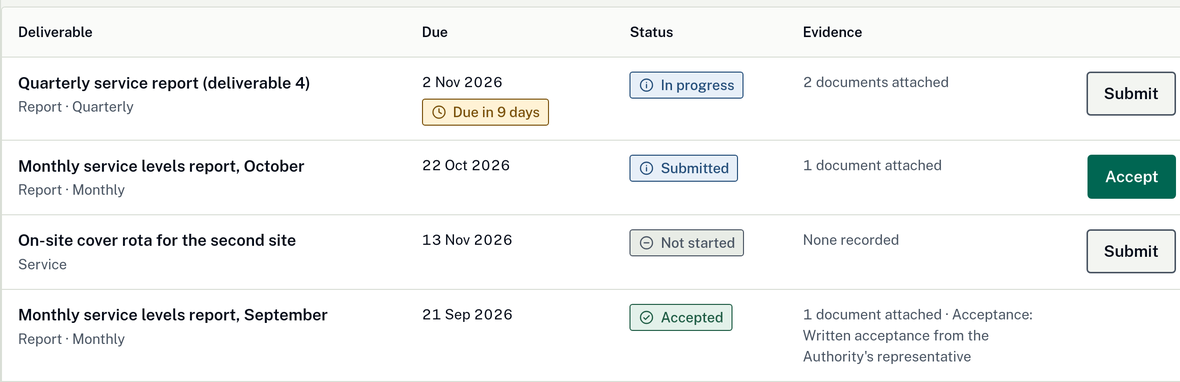
- 1Every due date from the record
- 2Proof attached to each deliverable
- 3Acceptance recorded before you invoice
Second site added to the on-site rota
Kept apart
What Fulfill asks
From your contract
What is still open on this contract
Money still open
Records kept
From your contract
Five areas in one contract record.
Five areas, the same on every plan. Short actions on the surface; the detailed controls appear only when the contract needs them.
Overview
What needs a decision
- Money still open, per contract and across all of them
- Being added
- What needs a decision this week, across every contract you are delivering
- Each issue with an owner, a next action and a date
- Fulfill on the web and on a phone on site; uploads wait until you are back online
Work
What must we do
- Every deliverable and line item in the contract, with due dates, submission methods and acceptance
- Reminders 14, 7, 3 and 1 days before each deliverable is due
- Ready to start? Site access, people, insurance and payment guarantees, with named blockers
- Being added
- Record today's work: dated records, quantities, photos, timesheets and files
- People and substitutions: the approval the contract requires, prepared in advance
- Work packages for each subcontractor: what each must deliver, sharing only the part that concerns them
Changes Being added
What is putting this job at risk
- Something changed: what, when, who instructed it and what evidence exists
- Instruction, notice, authorized change and agreed payment kept apart
- A countdown to the notice deadline, from the day a possible change is logged
- What changed? Before and after, with the original plan kept as it was
- Claimed, approved, billed and paid amounts never mixed; your money forecast counts only what is approved or paid
- Delays recorded with their cause: yours, the buyer's, shared, external, disputed or unknown
Money
What is stopping payment
- Invoices and payments tracked per contract, with a summary across all of them
- Being added
- Can I invoice? The missing items named before you send
- Exactly where each invoice is: sent, received by the buyer, checked, disputed, approved, scheduled for payment or paid
- Three dates: the contract's due date, the date you expect and the date it arrived
- Money left on this job, and the cash needed before the next payment
- Finishing the contract: the final invoice, money held back, returns and warranty dates, until the last one is done
Records
What can we prove afterwards
- Obligations read out of the contract, each with its clause, on one calendar
- A written summary of the work you delivered, drafted when the contract ends, yours to edit
- Export this contract's record as one organized file
- Being added
- Every event: what happened, when it was recorded, who confirmed it and the supporting file
- Prepare for the buyer's review of your work: agreed measures, accepted work and your reply, from the record
- Your documents stay yours and separate from every other customer's; you set what may be uploaded before any file is read
Start with where the work needs doing.
Start from the need: a trade near this site for the dates you need. Fulfill ranks the suppliers on your own list, shows coverage around the site and says why each result is there. Being added
Illustrative example Being added
- 1Thornquay Electrical LtdConfirmed service areaDelivered for you beforeAvailable for the dates
- 2Stavenholt Power ServicesWorked nearby beforeTypical price, for comparisonAvailability to confirm
- 3Coldharrow ContractorsRegistered address onlyAvailability unknown
No other confirmed available supplier was found in your selected sources. Being added Ask each supplier to confirm coverage and availability before you hire them.
An address nearby does not confirm coverage, availability or that a supplier meets the contract’s rules. Check those separately before hiring.
The record you take into the next bid.
When a contract closes, what you delivered, who accepted it and what the buyer agreed you may say about it become part of your company's own record. Being added The next time a tender asks for comparable work, the answer is already written and backed by that record.
- A written summary of the work you delivered, drafted from what the buyer accepted, for you to edit and approve.
- Reference permission recorded, so nothing is reused outside without the buyer's agreement. Being added
- Plain statements of fact, not odds: "three comparable jobs delivered", never a win percentage.
- Your own delivery figures, hours, materials and rework, improve your next estimate. They are never shared. Being added
Illustrative example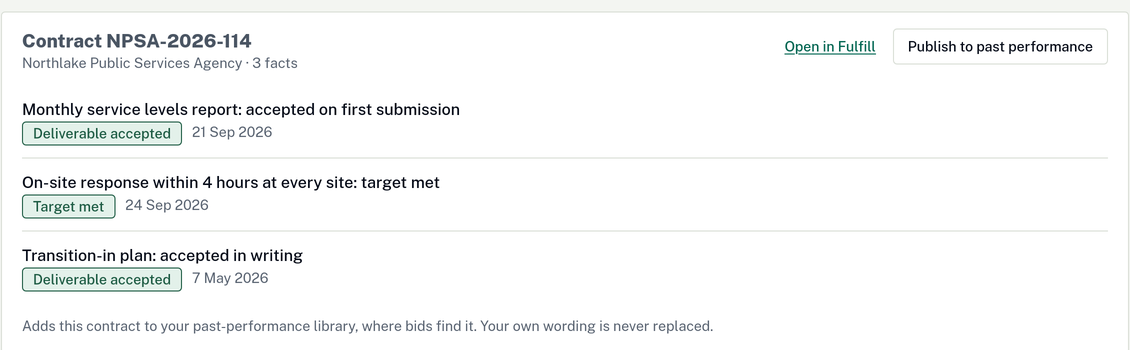
- 1Published straight to past performance
- 2Dated facts from delivered contracts
Choose by the contracts you manage at once.
All standalone Fulfill plans cover the same feature areas. The plans differ in users and active contracts. Features marked as being added are not available yet.
Fulfill Starter
2 contracts at a time
Your first awarded contracts
What Starter includes
- Every deliverable and line item in the contract, with due dates and acceptance
- Reminders 14, 7, 3 and 1 days before each deliverable is due
- Changes, notices and the money kept apart Being added
- Invoices, payments and the invoice-readiness check Being added
- Your supplier list ranked per contract, with outreach drafts
- The delivery record and a written summary of the work you delivered, when the contract ends
Then US$79/month
No charge for 14 days · Cancel anytime
Fulfill Team
8 contracts at a time
Several contracts under way
Everything in Starter, plus
- 3 users on one company account
- Up to 8 contracts running at the same time
- One overview and one money view across every contract Being added
- Subcontract work packages for every supplier on the job
Then US$199/month
No charge for 14 days · Cancel anytime
Fulfill Unlimited
Unlimited contracts
As many contracts as you win
Everything in Team, plus
- 5 users on one company account
- No limit on the contracts running at the same time
- Coverage lists for every site, across every contract Being added
Then US$449/month
No charge for 14 days · Cancel anytime
Already on a BidClarity plan?
Intelligence includes 2 active contracts in Fulfill, Command includes 10 and Enterprise has no limit.
Fulfill on its own is for teams that deliver contracts and don't bid through BidClarity.
When you reach your plan's contract limit
You can't activate another contract until one closes or you move up a plan. Every contract you already have stays open to read and export, with its obligations and records intact.
Bidding through BidClarity later?
Add Scout, Intelligence or Command to a Fulfill plan and keep your contracts. The delivery record is already in your company's own record for the next bid.
Questions before you start
Do I need Intelligence or Command to use Fulfill?
No. A Fulfill plan on its own gives you the contract delivery tools and your company profile, without the parts for finding and bidding on tenders. If you later want to bid through BidClarity, you add a plan and keep your contracts.
Can I bring a contract I won elsewhere?
Yes. Fulfill is also available without the tender-finding and bidding tools. The clause-linked import shown here is being added; check its status before relying on it during your trial. Being added
What reminders are available?
Deliverable reminders are sent 14, 7, 3 and 1 days before the due date. Reminders for invoices and obligations are coming soon; obligations already show on the calendar.
Does Fulfill decide whether we met the contract?
No. It shows the requirements and what your team recorded. Your team judges compliance, and the buyer confirms acceptance.
What happens to the documents I upload?
They stay yours and are kept separate from every other customer's files. You set what may be uploaded before any file is read, so a document you are not allowed to store elsewhere is refused rather than quietly kept. Being added The security page explains how files are handled.
What happens after the trial?
Your selected plan is charged after the 14-day trial unless you cancel before the first charge. Check the exact amount and date shown in your account.
Still have a question? Contact us.
Start with the contract on your desk.
Look at the tools for the work you are delivering now, and check which features are still being added. Card required; no charge for 14 days.